
BitlystBitlyst
PostsSeriesTopicsAbout

Bitlyst

Short, diagram-first posts on JavaScript, React & Next.js. Follow via RSS or the newsletter.

© 2026 Mohsen Fallahnejad

PostsSeriesTopicsLinksAboutRSSGitHubX
Posts/git
Beginner1 min read

Git Rebase vs Git Merge — Simple Guide

Understand the difference between git rebase and git merge with analogies, ASCII diagrams, and visual commit history diagrams.

Mohsen Fallahnejad

Mohsen Fallahnejad

Sep 16, 20251 readsDiscuss

When working with branches, you often need to bring changes from main into your feature branch. There are two main ways to do this: merge and rebase.


1. Git Merge#

What it does: Combines histories by creating a new merge commit.
History: Keeps both timelines intact (branching visible).
Analogy: Two rivers join into one bigger river.

bash
git checkout feature/login
git merge main

Result (ASCII):

code
A---B---C  main
     \
      D---E---M  feature/login

Visual diagram:
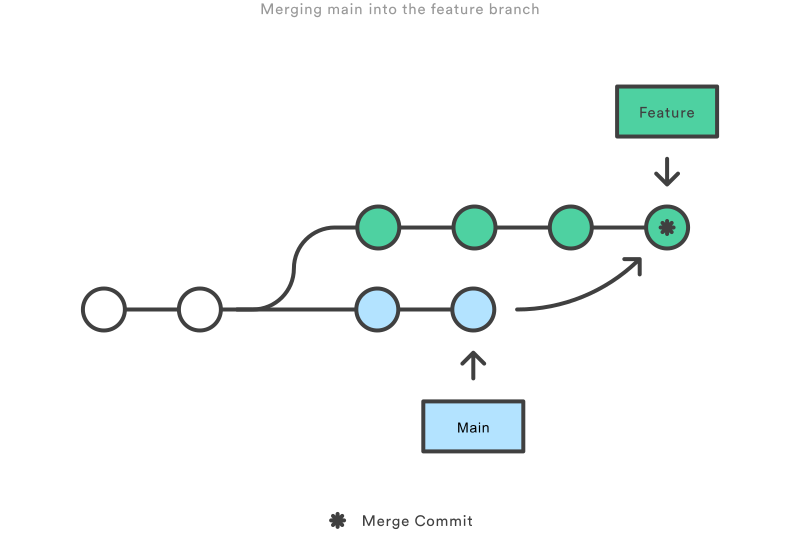
Git Merge DiagramGit Merge Diagram


2. Git Rebase#

What it does: Moves your branch to start on top of main, rewriting commits.
History: Linear, no merge commit.
Analogy: Pretend you started work after main’s latest changes.

bash
git checkout feature/login
git rebase main

Result (ASCII):

code
A---B---C---D'---E'  feature/login

Visual diagram:
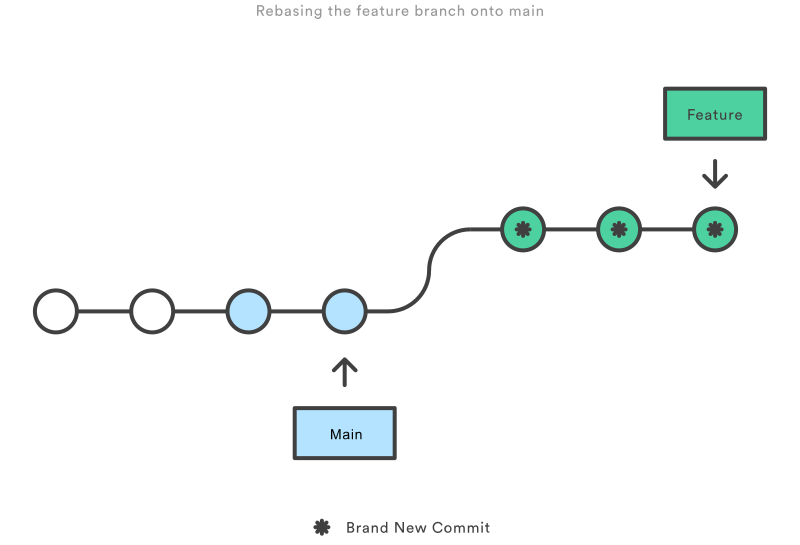
Git Rebase DiagramGit Rebase Diagram


3. When to Use#

  • Merge ✅

    • Shared branches.
    • Preserves history exactly.
    • Default in big teams.
  • Rebase ✅

    • Personal feature branches (before PR/MR).
    • Clean, linear history.
    • Avoid on public/shared branches (rewrites history).

4. Quick Mental Model 🧠#

  • Merge = "Add a commit that says: we combined work."
  • Rebase = "Replay my work as if I started from your latest state."

5. Interview Answer#

"Merge preserves history with a merge commit, while rebase rewrites commits on top of the target branch for a linear history. Use merge for shared branches, and rebase to clean up local branches before merging."


⚡ That’s it! Now you know when to use merge vs rebase.

Check out the Git Rebase vs Git Merge page for more information.

Filed under#git#version-control#rebase#merge#basics

Was this worth your time?

One tap tells me what to write more of.

Mohsen Fallahnejad

Written by

Mohsen Fallahnejad

Frontend engineer explaining JavaScript, React & Next.js internals in posts you can finish over coffee. More about me

X ↗GitHub ↗LinkedIn ↗
← OlderFrontend Design Patterns — A Practical GuideNewer →When Should You Use Dynamic Import in React/Next.js? (With Performance Comparison)

Start the discussion

Questions, corrections, a better approach? I read and reply to every comment.

Read next

Event Bubbling vs Event Capturing in JavaScript

Understand how events travel through the DOM: bubbling (bottom-up) vs capturing (top-down) with simple examples and mental models.

Sep 13, 20251 min read

Async vs Sync in JavaScript

Understand the difference between synchronous and asynchronous code in JavaScript with simple examples and analogies.

Sep 13, 20251 min read

What is Docker? The 2-minute mental model

Understand containers like folders for apps—portable and predictable.

Aug 11, 20251 min read

Get new posts in your inbox

No spam. Unsubscribe any time.

1 min left
Discuss👍 React
👍