
AbortController is the standard way to cancel async work in modern JavaScript. It pairs with AbortSignal, which you pass to tasks so they can stop immediately.
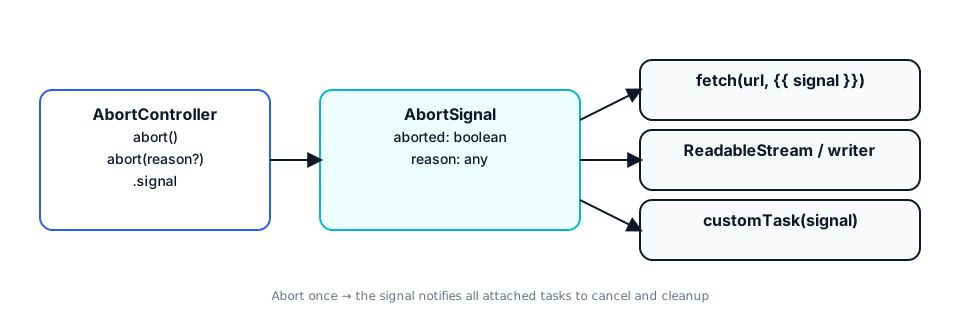 AbortController & AbortSignal
1) TL;DR#
- Create a controller → pass
controller.signalto your async work. - Call
controller.abort(reason?)to cancel; consumers see anAbortError(orsignal.reason). - Works with
fetch, streams, and your own functions.
js
const c = new AbortController()
const resP = fetch('/api/data', { signal: c.signal })
// later...
c.abort('user navigated away')
try { await resP } catch (e) { if (e.name === 'AbortError') /* ignore */ }
2) Core API (with reason support)#
js
const c = new AbortController()
const { signal } = c

signal.aborted        // boolean
signal.reason         // any (why it was aborted)

c.abort(new DOMException('Timeout', 'AbortError'))
// or: c.abort('User left the page')
Tip: If you pass a reason, propagate it in your own tasks.
fetchwill still reject withAbortError.
3) Fetch + Timeouts#
A) Easiest: AbortSignal.timeout(ms)
js
// Modern browsers & Node 18+
const res = await fetch('/slow', { signal: AbortSignal.timeout(3000) })
B) Manual timer
js
const c = new AbortController()
const id = setTimeout(() => c.abort(new DOMException('Timeout', 'AbortError')), 3000)
try {
  const res = await fetch('/slow', { signal: c.signal })
  // use res
} catch (e) {
  if (e.name !== 'AbortError') throw e
} finally {
  clearTimeout(id)
}
C) Race utilities
js
// winner-takes-all -> cancel the losers
const controllers = [new AbortController(), new AbortController()]
const [a, b] = controllers.map(c => fetch('/mirror', { signal: c.signal }))
const winner = await Promise.any([a, b])
controllers.forEach(c => c.abort('lost the race'))
4) Make Your Own Functions Abortable#
js
export function wait(ms, signal) {
  return new Promise((resolve, reject) => {
    const id = setTimeout(resolve, ms)
    const onAbort = () => { clearTimeout(id); reject(new DOMException('Aborted', 'AbortError')) }
    if (signal.aborted) return onAbort()
    signal.addEventListener('abort', onAbort, { once: true })
  })
}
Propagate reason:
js
const onAbort = () => reject(signal.reason ?? new DOMException('Aborted', 'AbortError'))
5) Streams & Readers (Browser + Node)#
js
const c = new AbortController()
const res = await fetch('/stream', { signal: c.signal }) // can be aborted
const reader = res.body.getReader({ signal: c.signal })   // abort affects reads too

// later
c.abort()
Node: fetch in Node 18+ also supports abort; for streams, pipe/reader operations should react to abort and close resources.
6) React Patterns#
A) Cancel on unmount (and on deps change)
tsx
useEffect(() => {
  const c = new AbortController()
  ;(async () => {
    try {
      const r = await fetch('/api/search?q=' + q, { signal: c.signal })
      setData(await r.json())
    } catch (e) {
      if (e.name !== 'AbortError') console.error(e)
    }
  })()
  return () => c.abort('component unmounted or q changed')
}, [q])
B) Latest-typed value wins (typeahead)
tsx
const ref = useRef<AbortController | null>(null)
async function onType(v: string) {
  ref.current?.abort('superseded')
  const c = new AbortController()
  ref.current = c
  try {
    const r = await fetch('/api?q=' + v, { signal: c.signal })
    setOptions(await r.json())
  } catch (e) { if (e.name !== 'AbortError') console.error(e) }
}
7) Small Utilities (copy‑paste)#
js
// create a controller that auto-aborts after ms
export const withTimeout = (ms = 5000) => AbortSignal.timeout(ms)

// combine multiple signals -> aborted if ANY aborts
export function anySignal(...signals) {
  const c = new AbortController()
  const onAbort = (s) => c.abort(s.reason ?? new DOMException('Aborted', 'AbortError'))
  signals.forEach(s => s.addEventListener('abort', () => onAbort(s), { once: true }))
  return c.signal
}
Usage:
js
const c = new AbortController()
const s = anySignal(c.signal, AbortSignal.timeout(3000))
fetch('/x', { signal: s })
8) Common Pitfalls & Gotchas#
- Not wiring the signal → pass
{ signal }everywhere the task supports it. - Forgetting cleanup → clear timers and remove listeners on abort (use
{ once: true }). - Swallowing all errors → only ignore
AbortError; surface real failures. - Global controller reuse → create fresh controllers per operation to avoid accidental cross‑cancels.
- Overriding reason → if you care about why, use
abort(reason)and readsignal.reasonin custom code.
9) Quick Cheatsheet#
| Need | Do this |
|---|---|
| Cancel slow fetch | fetch(url, { signal: AbortSignal.timeout(ms) }) |
| Cancel on unmount | Create AbortController in useEffect, abort in cleanup |
| Cancel prior request (search) | Keep last controller in ref, abort before new fetch |
| Cancel a batch | Share one controller across requests and call abort() |
| Keep “why” it was cancelled | controller.abort('reason'); signal.reason |
Happy cancelling ✨ Use AbortController to keep your apps snappy, correct, and memory‑leak free.

Start the discussion
Questions, corrections, a better approach? I read and reply to every comment.